Hybrid Heating Mode
Hybrid is the self-learning heating algorithm of the DIYLESS OpenTherm Thermostat. This guide explains what it does, how it differs from the classic PID algorithm, how to set it up, what the settings mean, and how to read its status. Hybrid is available starting with firmware version 3.0; if your thermostat runs an older version, update its firmware first.
What it is
Hybrid computes the boiler water temperature (the OpenTherm flow setpoint) and decides when the boiler may run, from three cooperating ideas:
- a weather curve decides what water temperature the house needs right now, from the outside temperature,
- a room correction nudges that value by a limited amount to close the remaining room-temperature error,
- a cycling protection layer decides whether the burner may run at all, and protects the appliance from short-cycling, from running hotter than it needs to, and from damaging temperatures.
On top, a slow learning layer tunes the curve, the warm-up time of your home and the boiler's minimum-output level, so the system improves by itself over the first weeks.
You select it on the Heating page ("Hybrid — Recommended, self-learning"). It is opt-in: a firmware update never switches an existing thermostat to it, and the other algorithms (PID, Heating curve, Constant temperature) work exactly as before. If you switch away and back, what Hybrid learned is kept.
Hybrid compared with PID and the other classic algorithms
| Classic algorithms | Hybrid |
|---|---|
| PID reacts to room error only. With its default gain, even a moderate error drives the boiler to maximum temperature. Example — room 3 K too cold: an instant 78 °C request, return water at 72 °C (no condensing), burner running 91 % of the time | requests what the weather actually calls for (about 46 °C in the same situation), raises it gradually, and steers the return temperature back into the condensing range |
| PID has to re-discover the right water temperature through its integral after every weather change — drift on cold fronts, overshoot on mild days | the weather curve supplies the right temperature immediately; the room correction only handles the remainder |
| PID uses the same fixed gains for radiators, underfloor heating and heat pumps | profiles per heat source and emitter type; the correction adapts to the weather |
| Heating curve / Constant temperature switch a modulating boiler fully on and off around the room setpoint | continuous modulation around the curve |
| no protection when the house needs less heat than the boiler's minimum output — the burner short-cycles | minimum burn and off times, controlled restarts, low-load pulsing |
| return temperature is ignored | condensing boilers are kept in the condensing range whenever comfort allows |
| a scheduled 07:00 setpoint starts heating at 07:00 | optimum start: the room is ready by 07:00 |
| thermostat mode Off means no frost protection | frost protection works in every mode |
| all tuning is manual and static | curve, warm-up model and minimum-output level are learned |
Two guarantees frame the design:
- Works with any OpenTherm boiler. Only the mandatory OpenTherm data (status, flow setpoint, boiler water temperature) is assumed. Everything else — return temperature, modulation, outside sensor, counters — is probed, checked for plausibility, and used only when trustworthy.
- Degrades gracefully, never silently. Every part checks its own preconditions and steps aside when they fail. With nothing optional available, Hybrid still behaves like a gentle PID plus cycling protection and frost safety — and the status page tells you so.
How it works
Capability check. Optional boiler data is probed at start-up and continuously checked for plausibility, because some boilers acknowledge data they do not really provide — a return sensor stuck at zero, an outside sensor that isn't fitted, a modulation limit that is accepted but ignored. Untrustworthy data is set aside and re-tested later, and the features that depend on it switch off individually. The result is remembered per boiler; after a boiler replacement everything is probed again.
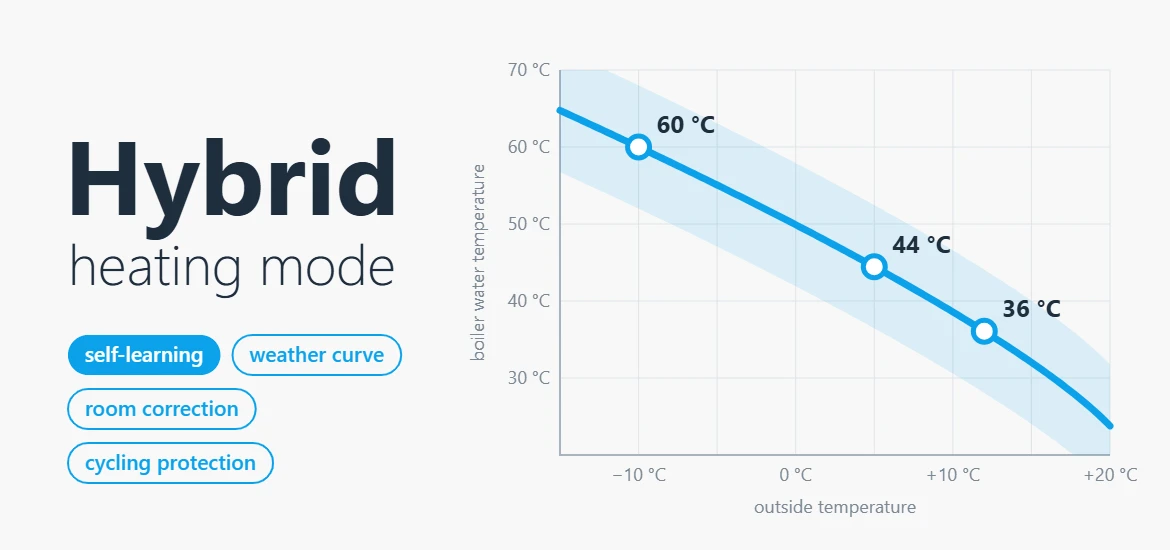
Weather curve. A heating curve anchored at your room setpoint, with one main parameter — Flow at −10 °C: the water temperature your home needs on a −10 °C day. The curve shape matches your emitters (radiators, underfloor, fan-coils). Example for radiators with setpoint 21 °C and flow at −10 °C = 60: about 60 °C at −10 °C outside, 44 °C at +5 °C, 36 °C at +12 °C. The outside temperature is smoothed so that short fluctuations and coarse weather-service updates don't disturb the boiler, while real weather trends are followed promptly.
Room correction. The room temperature shifts the curve up or down, strictly within the trim authority you allow (0 = pure weather compensation). The correction is gentle in mild weather and firmer in the cold, is designed not to overshoot after long warm-ups, stays calm when the room is close to the setpoint, and survives restarts and firmware updates. Setpoint changes and the loss or return of the outside temperature do not cause jumps in the requested water temperature.
Cycling protection. Every burner start wastes energy and wears the appliance, so Hybrid:
- keeps each burn alive for a minimum time, rests the burner after a burn that ended early, and limits starts per hour;
- allows the next start only when a real heat deficit has built up, not merely because a timer expired;
- pulses at low load: in mild weather most homes need less heat than the boiler's minimum output. Instead of letting the boiler short-cycle on its own, Hybrid runs few, long, controlled burns at the boiler's minimum level, which it learns by itself (or measures once with the optional calibration). If the boiler declares that it manages low load itself, pulsing is switched off automatically, as the OpenTherm specification requires.
Seasonal and comfort logic.
- Heating limit (automatic summer mode): no heating while it has been warm enough outside for long enough — a cool summer evening does not fire the boiler. A sudden cold snap or frost risk overrides it.
- Quick setback: when the setpoint drops (e.g. the night schedule), heating stops and the house coasts down to the new setpoint.
- Open-window detection: a sudden, sustained drop in room temperature while heating suspends the heating for a while. A single faulty sensor reading cannot trigger it.
Protection.
| Mechanism | Behaviour |
|---|---|
| Flow ramp limit | the requested temperature rises gradually — extra gently during the first days after enabling. Boilers may skip the limit when the room is clearly cold; heat pumps never skip it |
| Condensing guard | condensing boilers with a trustworthy return sensor: once the room is comfortable, the flow is lowered step by step to bring the return below the target. Never active while the room is still warming up |
| Non-condensing burn floor | non-condensing boilers: the flow is kept above a minimum while burning, to protect the heat exchanger from corrosion |
| Emitter safety cap | underfloor heating: a hard flow ceiling that no other function can exceed — protects the screed |
| Heat pumps | an appliance that looks like a heat pump is automatically treated gently, and the page suggests the heat-pump profile. Defrost cycles are recognised and not mistaken for a control problem |
| Frost protection | in every mode, including Off: a room below the frost threshold is heated. In Cool mode it also stops cooling |
| Communication loss | if the boiler cannot be reached for more than a minute, the heating request is switched off and learning pauses |
Learning.
- Self-learning curve: at night the curve is adjusted in small steps, based on how much room correction was needed — using only clean data (no sun, no recent setpoint changes, steady heating). Typical convergence: 2–4 weeks. If you edit the curve by hand, learning pauses and the page says so.
- Catch-up boost: if the curve is set far too low and the room stalls well below the setpoint, the curve is raised slowly until the room starts climbing again; normal learning then takes over. Example — a home with undersized radiators reaches its 21 °C setpoint instead of stalling at 18 °C.
- Optimum start: with a schedule, setpoints are applied early so the room is ready by the scheduled time. The warm-up speed of your home is learned from every morning warm-up and takes the outside temperature into account; the preheat is capped by a limit you set. Changing the setpoint yourself during a preheat cancels it. Inactive during a Boost / Away / Vacation hold.
- Anti-legionella boost (off by default): a weekly hot-water boost to 60 °C on systems with a cylinder. If the boiler cannot reach 60 °C or does not allow the setpoint to be changed, the function reports itself as unsupported rather than pretending to work.
- Statistics: burner starts, burning time and average burn length for the last 24 h, room-temperature error, share of time in the condensing range.
Everything learned is stored in the thermostat and survives restarts and updates. Reset learned state in the service section clears it.
Setup
- Heating page → Hybrid → Save. If you previously configured the classic heating curve, the page shows what it corresponds to at −10 °C, to use as the starting Flow at −10 °C.
- Give it an outside temperature (Heating page → Weather · outside temperature): the boiler's own outdoor sensor (Auto or OpenTherm), a wired sensor, a web weather service (requires your location) or MQTT. Auto uses the boiler's own sensor — if your boiler has none, choose one of the other sources. Without any outside temperature Hybrid still works, in its room-only fallback.
- Hybrid algorithm page → Quick setup: choose heat source, emitters and building weight, press Apply profile, review the highlighted fields, then Save changes. Nothing reaches the thermostat until you save. Changing only the appliance type does not change the other values — use Apply profile.
Profiles
| Setting | Universal (default) | Radiators + boiler | Underfloor + boiler | Heat pump | Hybrid appliance |
|---|---|---|---|---|---|
| Flow at −10 °C | 55 | 60 | 40 | 45 | 50 |
| Trim authority (±K) | 8 | 10 | 5 | 5 | 6 |
| Min burn / min off (s) | 180 / 300 | 180 / 300 | 300 / 300 | 600 / 600 | 600 / 600 |
| Max starts per hour | 6 | 6 | 6 | 3 | 3 |
| Flow ramp limit (K/min) | 1.5 | 2.0 | 1.0 | 0.5 | 0.5 |
| Condensing-guard target (°C) | 52 | 52 | 50 | — | 52 |
| Preheat cap (min) | 180 | 180 | 300 | 300 | 240 |
| Recommended night setback | any | any | shallow (≤ 2 K) | none or ≤ 1 K | shallow |
Profiles also adjust the advanced settings. Underfloor profiles set the emitter safety cap to 50 °C; the non-condensing heat source sets the burn floor to 50 °C. The Universal values are safe for every system: cautious where they must guess, corrected by learning where they can.
What to expect after enabling
| When | What happens |
|---|---|
| First minutes | boiler capabilities are probed; heating starts with a gentle ramp |
| First days | the boiler's steady-burn level is learned and low-load pulsing becomes available |
| Weeks 1–3 | the curve converges; the 24-hour statistics show fewer, longer burns |
| First schedule | optimum start learns from the first few morning warm-ups |
When something is missing
| Situation | What Hybrid does |
|---|---|
| No outside temperature for several hours | room-only fallback: control continues on room temperature alone, without a jump; cycling protection, frost protection and statistics stay active; the heating limit is inactive. Returns to the curve automatically |
| Clock not set (no internet time) | heating control works fully; curve learning, optimum start, schedules and the legionella boost wait for the time |
| Room sensor fails | the thermostat's general "sensor failure" setting applies, as with the other algorithms |
| Boiler lacks return temperature, modulation, capacity or counters | the features that need them switch off individually; cycling protection keeps working from the flame signal alone |
| Boiler ignores the modulation limit | pulsing still works; calibration is unavailable |
| Boiler manages low load itself | pulsing off |
| Boiler replaced | capabilities re-probed, minimum-output level re-learned; curve and warm-up model kept (they describe the house) |
| Boiler communication lost | fail-safe: heating request off; learning frozen |
| Manual boiler override | bypasses Hybrid completely, including cycling protection |
| Cool mode | Hybrid does not heat, but frost protection stays armed |
Good to know: one room sensor controls one heating circuit (no per-room balancing), and the 24-hour statistics restart after a reboot.
Settings reference
All settings are on the Hybrid algorithm page. Names in code are the field names used by configuration export/import and the local API. Most users only need Quick setup and the first two settings below.
Comfort & heating curve
| Setting | Default | Range | Meaning |
|---|---|---|---|
Flow at −10 °C flowAtDesign |
55 °C | 28–85 | the main curve parameter; tuned automatically when self-learning is on. Raise it if the house is too cold in cold weather, lower it if it overheats |
Trim authority trimAuth |
8 K | 0–15 | how far the room temperature may move the curve; 0 = pure weather compensation |
Self-learning curve adaptCurve |
on | nightly curve tuning and catch-up boost | |
Quick setback quickSetback |
on | coast down after a setpoint drop | |
Optimum start optStart |
on | apply scheduled setpoints early ("ready by") | |
Preheat cap maxPreheatMin |
180 min | 30–360 | longest allowed preheat |
Emitter exponent emitExp |
1.25 | 1.0–1.4 | curve shape: radiators 1.3 / underfloor 1.1 |
Outside filter outFilterH |
2 h | 0.5–6 | smoothing of the outside temperature used by the curve |
Building time constant bldTimeConstH |
25 h | 5–60 | light 15 / medium 25 / heavy 40; used by the heating limit |
Heating-limit delta heatLimitD |
3 K | 0–8 | how much colder than the setpoint it must be outside before heating is allowed; 0 = off |
Gain base kpBase |
2.5 | strength of the room correction |
Cycling protection
| Setting | Default | Range | Meaning |
|---|---|---|---|
Minimum burn minBurnSec |
180 s | 60–900 | burns are kept alive at least this long |
Minimum off minOffSec |
300 s | 60–900 | rest after a burn that ended early |
Max starts per hour maxCyclesH |
6 | 2–12 | upper limit of burner starts |
Low-load pulsing pwmLowLoad |
on | controlled long burns when the house needs less than the boiler's minimum | |
Degree-minutes release dmRelease |
30 K·min | 0–120 | heat deficit required before the next start; higher = fewer starts |
Flow ramp limit rampLimit |
1.5 K/min | 0.3–3 | how fast the requested temperature may rise |
Appliance & safety
| Setting | Default | Range | Meaning |
|---|---|---|---|
Appliance type applType |
condensing gas | condensing gas / non-condensing / heat pump / hybrid | |
Frost protection frostProt |
on | works in every thermostat mode | |
Frost threshold frostTemp |
6 °C | 2–10 | |
Condensing-guard target condTarget |
52 °C | 0 / 45–58 | desired maximum return temperature; 0 = off |
Non-condensing burn floor boilerFloor |
0 (off) | 0 / 45–60 | minimum flow while burning; 50 for non-condensing boilers |
Emitter safety cap emitterCap |
0 (off) | 0 / 35–60 | hard flow ceiling; 50 for underfloor heating |
Hot water
| Setting | Default | Meaning |
|---|---|---|
Anti-legionella boost legionellaEn |
off | weekly 60 °C boost, cylinder systems only |
Boost day legionellaDay |
Sunday | runs at night |
Reading the status
The Hybrid algorithm page refreshes every few seconds.
- Banner: a warning when Hybrid is not in control (another algorithm selected, or manual boiler override); an information note when no outside temperature is available (room-only fallback); a hint when the appliance looks like a heat pump but a boiler profile is selected.
- Right now: whether Hybrid is active, the boiler water target, room temperature → setpoint, the current room correction, the outside temperature used by the curve, and a plain-language status:
| Status | Meaning |
|---|---|
| Normal | modulating heating, or idle |
| Low-load pulsing | controlled long burns in mild weather |
| Coasting down | quick setback after a setpoint drop |
| Paused — warm enough outside | heating limit active |
| Condensing guard | flow being lowered to keep the return cool |
| Open window detected | heating temporarily suspended |
| Catch-up boost | curve being raised because the room is stuck below setpoint |
| Calibrating | minimum-output calibration in progress |
| Hot-water boost | anti-legionella run in progress |
- Diagnostics (expandable): curve value before correction, smoothed outside temperature, pulsing duty, lifetime burner starts and hours, boiler-reported capacity and minimum modulation, the capability map, and the raw controller state.
- Last 24 h: burner starts, burning time, average burn length, room error, condensing share. Healthy direction: fewer and longer burns, room error under ±0.3 K, a high condensing share.
- Curve preview: the curve drawn from the values in the form, with the design point (−10 °C) and the live operating point.
- Service: Start calibration / Cancel, Run the boost now, Reset learned state. Calibration takes up to about 20 minutes and may end without a result on a mild day — the boiler's minimum output is then more than the house can absorb. Run it in colder weather.
The Heating page additionally shows a live Flow demand now row for every algorithm.
For integrators
| Interface | Use |
|---|---|
GET /algo-state |
live state, status flags, 24-hour statistics and the current settings as JSON |
POST /algo-action |
{ "action": "calibrate" | "cancel" | "reset" | "legionella" } |
Serial console algo |
without arguments prints the live state; sub-commands cap, kpi, calibrate, cancel, reset, legionella |